Blog Archive

Showing posts with label ANDROID LAUNCHER. Show all posts

iLauncher 2.0.10.7 (Full) Apk


iLauncher 2.0.10.7 (Full) Apk | 993 KB | Mediafire / MirrorCreator
Requires Android:2.1 and up

AndroidApps.Tk

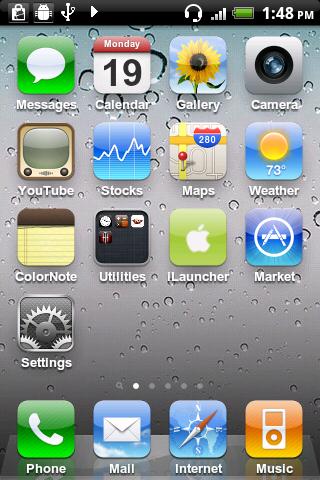
iPhone style home screen launcher. This is an iPhone style home screen launcher. The launcher makes your phone work just like a real iPhone.

v2.0.10.7 update:
- rollback on icon processing
- 'Exit Launcher' menu disabled for some memory issues

** This is NOT a fake screen nor an icon pack. **

- Smooth scrolling.
- Icons have rounded corners and gloss effects.
- Long touch icons to move them around and position them as you like.
- Supports a customizable dock-bar.
- Easily uninstall apps from your home screen.
- Press the back hardware key to exit edit mode.
- Spotlight search

This version aims to replicate the home screen functions provided by iOS 3. Features that are not supported in the current version will eventually be supported in later 1.x versions. Features available on iOS 4 and later are planned to be supported in version 2.0.

Tested with HTC Legends, Galaxy S, Nexus One, HTC Desire.

Download

Download - Market

iLauncher 2.0.10.6 (Full) Apk


iLauncher 2.0.10.6 (Full) Apk | 993 KB | Mediafire / MirrorCreator
Requires Android:2.1 and up

AndroidApps.Tk

iPhone style home screen launcher. This is an iPhone style home screen launcher. The launcher makes your phone work just like a real iPhone.

v2.0.10.6 update:
- tried to fix crashes. hope it works.
- can change wallpaper
- can exit launcher

** This is NOT a fake screen nor an icon pack. **

- Smooth scrolling.
- Icons have rounded corners and gloss effects.
- Long touch icons to move them around and position them as you like.
- Supports a customizable dock-bar.
- Easily uninstall apps from your home screen.
- Press the back hardware key to exit edit mode.
- Spotlight search

This version aims to replicate the home screen functions provided by iOS 3. Features that are not supported in the current version will eventually be supported in later 1.x versions. Features available on iOS 4 and later are planned to be supported in version 2.0.

Tested with HTC Legends, Galaxy S, Nexus One, HTC Desire.

Download

Download - Market

QQLauncher Pro 2.1.1.296 Apk (HOLIDAY EDITION)


QQLauncher Pro 2.1.1.296 Apk | 4.7 MB | Mediafire / MirrorCreator
Requires Android:2.0 and up

AndroidApps.Tk

A superior Android-based desktop application, QQ Launcher Pro replaces conventional desktops with an enhanced range of frequently used desktop features such as screen and program management. Flashier in the looks department, the solution couples richer functionality with superior performance.

v2.1.1.296 change log:
1. LIVE "Holiday" theme
2. Support "shortcut" in edit mode
3. Some bug fix

[V2.1 HOLIDAY EDITION]
This edition has packed a LIVE "Holiday" theme which can make your phone snowing!
Have Fun!

The launcher supports the following cool features:
1. Built-in widgets such as shortcut switches and task manager;
2. Impressive screen-switching effects (menu > settings > screen);
3. A complete set of program management functions, free sequencing, multidimensional arrangements, and smart searches;
4. Quick access to the Store for users to download applications anytime;
5. Custom folders that classify applications;
6. One-key desktop relocation without losing anything. (Tapping OK after the first installation will guide you through importing default desktop icons.)
7. Provide several sets of personalized skin;
8. Cool Lock Screen.

Download

iLauncher 2.0.10.5 Apk


iLauncher 2.0.10.5 Apk | 993 KB | Mediafire / MirrorCreator
Requires Android:2.1 and up

AndroidApps.Tk

iPhone style home screen launcher. This is an iPhone style home screen launcher. The launcher makes your phone work just like a real iPhone.

v2.0.10.5 update:
- Improved performance and layouts on high resolution device
- Icon backup is now supported, but i made it roughly so use it with care. Avoid using it when usb connected, downloading an app, updating apps.

** This is NOT a fake screen nor an icon pack. **

- Smooth scrolling.
- Icons have rounded corners and gloss effects.
- Long touch icons to move them around and position them as you like.
- Supports a customizable dock-bar.
- Easily uninstall apps from your home screen.
- Press the back hardware key to exit edit mode.
- Spotlight search

This version aims to replicate the home screen functions provided by iOS 3. Features that are not supported in the current version will eventually be supported in later 1.x versions. Features available on iOS 4 and later are planned to be supported in version 2.0.

Tested with HTC Legends, Galaxy S, Nexus One, HTC Desire.

Download

Download - Market

iLauncher 2.0.10.4 Apk


iLauncher 2.0.10.4 Apk | 993 KB | Mediafire / MirrorCreator
Requires Android:2.1 and up

AndroidApps.Tk

iPhone style home screen launcher. This is an iPhone style home screen launcher. The launcher makes your phone work just like a real iPhone.

v2.0.10.4 update:
- fixed bug

** This is NOT a fake screen nor an icon pack. **

- Smooth scrolling.
- Icons have rounded corners and gloss effects.
- Long touch icons to move them around and position them as you like.
- Supports a customizable dock-bar.
- Easily uninstall apps from your home screen.
- Press the back hardware key to exit edit mode.
- Spotlight search

This version aims to replicate the home screen functions provided by iOS 3. Features that are not supported in the current version will eventually be supported in later 1.x versions. Features available on iOS 4 and later are planned to be supported in version 2.0.

Tested with HTC Legends, Galaxy S, Nexus One, HTC Desire.

Download

Download - Market

Full Screen Launcher Pro 1.6.1 Apk


Full Screen Launcher Pro 1.6.1 Apk | 587 KB | Mediafire / MirrorCreator
Requires Android:2.2 and up

AndroidApps.Tk

The Full Screen Launcher is a replacement home screen for your android Device. This 3D launcher will give you unlimited space on your phone home screen and quick access to your contacts and applications.

v1.6.1 update:
- improved : bitmap memory usage
- improved : framerate
- fixed : icons not showing on first startup
- fixed : camera no longer move when pressing home key
- added : animation when dropping an item inside folder
- added : pl translation

--== Features ==--
- 3D wall : the desktop becomes a big wall with OpenGL ultra smooth scrooling
- Coll animation when switching walls
- Widget support : widget dropped on the desktop are converted to 3D and shown back in 2D when needed (tested with Facebook, Calendar, power and weather widgets...)
- Full Screen Caller ID integration : drop HD picture of your favorite contacts for easier access.
- Folder : Unclutter your home screen with folders. Each folder is displayed as a new wall and can contains widgets, application icons, contacts.
- Wallpaper support : when zooming inside your wall, the android wallpaper zoom
- Live Wallpaper support

--== How to use ==--
Press your home button to select the Full Screen Launcher as the default launcher.
The first use will render textures into cache, this might slows down the application.
To add widget, shortcuts or contacts to your home screen, simply long press the desktop.
All items can be picked with a long press.
To create folder, long press the desktop and choose add folder. You can now drop any items in your new folder. Folders are shown on the home screen as a 3D cube previewing the content of the folder.

Download

Download- @ Market

GO Launcher EX 2.70 Final Apk


GO Launcher EX 2.70 Final Apk | 4.3 MB | Mediafire / MirrorCreator
Requires Android:2.0 and up

AndroidApps.Tk

v2.70 update:
1. (New) Use the “icon size” option to change sizes of both homescreen and dock icons
2. (Improve) Homescreen indicator returns to top area when using large icon size
3. (Improve) If no enough room for adding GO widgets, enter preview screen to select other screens
4. (Improve) Delete and rewrite most of toast info
5. (Improve) Scroll effect of introduce screen indicator is improved (the first time install GO Launcher)

Features:
- Hundreds of themes
- Fancy home screen transition
- Smooth scrolling experience
- Icon popup menu
- Folder and task manager in app drawer
- Gesture supported
- Scrollable & resizable widgets supported

Fixed:
- Add shortcut of GO Launcher (Long press home screen-Shortcut- GO Launcher).
- Synchronize home folder and app draw folder.
- Directly drag to change app icon on dock bar.
- Directly open folder on dock bar.
- Add 3D transition for vertical continuous scrolling (MENU-Preferences-Effects Settings-Vertical scroll effect).
- Support single screen wallpaper (MENU-Preferences-Screen Settings-Normal/Portrait Wallpaper).

Download

iLauncher 2.0.10.3 Apk


iLauncher 2.0.10.3 Apk | 993 KB | Mediafire / MirrorCreator
Requires Android:2.1 and up

AndroidApps.Tk

iPhone style home screen launcher. This is an iPhone style home screen launcher. The launcher makes your phone work just like a real iPhone.

v2.0.10.3 update:
- fixed restarting problem
- now can change icon's title
- application list is now sorted by each app's name and provide fast scroller

** This is NOT a fake screen nor an icon pack. **

- Smooth scrolling.
- Icons have rounded corners and gloss effects.
- Long touch icons to move them around and position them as you like.
- Supports a customizable dock-bar.
- Easily uninstall apps from your home screen.
- Press the back hardware key to exit edit mode.
- Spotlight search

This version aims to replicate the home screen functions provided by iOS 3. Features that are not supported in the current version will eventually be supported in later 1.x versions. Features available on iOS 4 and later are planned to be supported in version 2.0.

Tested with HTC Legends, Galaxy S, Nexus One, HTC Desire.

Download

Download - Market

iLauncher 2.0.10.1 Apk


iLauncher 2.0.10.1 Apk | 993 KB | Mediafire / MirrorCreator
Requires Android:2.1 and up

AndroidApps.Tk

iPhone style home screen launcher. This is an iPhone style home screen launcher. The launcher makes your phone work just like a real iPhone.

v2.0.10.1 update:
- This is something like a beta version of v2.1.
- Folder is partially implemented.

** This is NOT a fake screen nor an icon pack. **

- Smooth scrolling.
- Icons have rounded corners and gloss effects.
- Long touch icons to move them around and position them as you like.
- Supports a customizable dock-bar.
- Easily uninstall apps from your home screen.
- Press the back hardware key to exit edit mode.
- Spotlight search

This version aims to replicate the home screen functions provided by iOS 3. Features that are not supported in the current version will eventually be supported in later 1.x versions. Features available on iOS 4 and later are planned to be supported in version 2.0.

Tested with HTC Legends, Galaxy S, Nexus One, HTC Desire.

Download

Download - Market

GO Launcher EX 2.69 Final Apk


GO Launcher EX 2.69 Final Apk | 4.3 MB | Mediafire / MirrorCreator
Requires Android:2.0 and up

AndroidApps.Tk

v2.69 change log:
1. (New) Tab style for Menu (supports to slide left and right)
2. (New) Q&A option in “About GO Launcher EX”
3. (New) Plus button in home screen folder
4. (Improve) Search function of GO Store

Features:
- Hundreds of themes
- Fancy home screen transition
- Smooth scrolling experience
- Icon popup menu
- Folder and task manager in app drawer
- Gesture supported
- Scrollable & resizable widgets supported

Fixed:
- Add shortcut of GO Launcher (Long press home screen-Shortcut- GO Launcher).
- Synchronize home folder and app draw folder.
- Directly drag to change app icon on dock bar.
- Directly open folder on dock bar.
- Add 3D transition for vertical continuous scrolling (MENU-Preferences-Effects Settings-Vertical scroll effect).
- Support single screen wallpaper (MENU-Preferences-Screen Settings-Normal/Portrait Wallpaper).

Download

Launcher 7 – Donate 1.0.1.26 Apk


Launcher 7 – Donate 1.0.1.26 Apk | 1.5 MB | Mediafire Download
Requires Android:2.1 and up

A Windows Phone 7 style launcher for Android. Unlike other current WP7 launchers (Windows Phone Android, Metro UI), this one allows you to properly modify your start screen. Just long press on a tile and drag tile where you want!

v1.0.1.26 update:
- popular crashes fixed
- it is now possible to specify text color for most of the tiles

Also supported:
- 2 x 1 tiles
- Original Windows Phone 7 backgrounds!
- Freely configurable tile colors
- Launcher options are available from Application List (press menu in app list)
- Layout animations
- Animated contacts tile! (still work in progress)

TODO-list:
- configurable animation parameters (soon)
- folders (in donate version now)
- clock tile of sorts
- more animated tiles
- facebook integration

Consider this as alpha quality at best. If it crashes, please email me or report the crash and we'll figure out a fix.

Recommended HDPI device, tested on Galaxy i9000.

MDPI devices should be now able to show things in correct scale, but performance and memory usage may very well be a problem in these devices.

Download

Download - Market

iLauncher 2.0.0.1 Apk


iLauncher 2.0.0.1 Apk | 993 KB | Mediafire / Multiupload
Requires Android:2.1 and up

AndroidApps.Tk

iPhone style home screen launcher. This is an iPhone style home screen launcher. The launcher makes your phone work just like a real iPhone.

v2.0.0.1 update:
- fixed the problem that unsetting customized icon didn't work
- fixed a crash on spotlight search

** This is NOT a fake screen nor an icon pack. **

- Smooth scrolling.
- Icons have rounded corners and gloss effects.
- Long touch icons to move them around and position them as you like.
- Supports a customizable dock-bar.
- Easily uninstall apps from your home screen.
- Press the back hardware key to exit edit mode.
- Spotlight search

This version aims to replicate the home screen functions provided by iOS 3. Features that are not supported in the current version will eventually be supported in later 1.x versions. Features available on iOS 4 and later are planned to be supported in version 2.0.

Tested with HTC Legends, Galaxy S, Nexus One, HTC Desire.

Download Or Download

Download - Market

CircleLauncher 2.0.7 Apk


CircleLauncher 2.0.7 Apk | 600 KB | Mediafire / Multiupload
Requires Android:2.1 and up

AndroidApps.Tk

Start your apps or call your best friends - but with style! This widget will help you to start your prefered apps or call your best friends - but with style!

2.0.7 update:
- add contact app to contacts list
- show selected apps at the beginning of the app list

You can add some frequently used apps, contacts or bookmarks to this launcher and start those apps, contacts or bookmarks with one click from a circle, a horizontal or a vertical line. Use the included launcher icons, load your own image or use a icon from any icon pack (CircleLauncher icon packs and ADW launcher icon packs supported). If you slide over the icons, they are animated a little bit mac-like ... just try it!

Additional features in the full version:
- custom icons for the icon on the homescreen
- support for ADW icon packs for the icon on the homescreen
- vertical and horizontal launcher versions

Some icons in the screenshots are from 'CircleLauncher IconPack One' and the wallpaper is 'wp clock full'.

Facebook-User, please read: Restricted contacts are created by the Facebook sync adapter. These contacts are accessible to a whitelist of applications, which is specified and enforced by Facebook. The restricted contact API is private, which means that nobody (with the exception of Facebook) should be using it at this point. So the only way to get the pictures from your Facebook contacts is to use another tool to synchronize. I would suggest to use 'SyncMyPix', please try it!

To add widget press on Home: Menu->Add->Widget->CircleLauncher

Please don't move the app to the sd card - it won't work! And if the widget don't appear after the installation, just wait a few moments.

Download Or Download

Download - Market

ADWLauncher EX 1.3.3.56 Apk


ADWLauncher EX 1.3.3.56 Apk | 1.8 MB | Multiupload
Requires Android:1.6 and up

AndroidApps.Tk

Highly Customizable Home replacement application with hundreds of themes and icons.

v 1.3.3.56 update:
- Option to completely disable the dock.
- Small fixes.
- When you trigger the "hide/show dockbar" action/gesture, the new status will be remembered until you show/hide it again. Don't like the dock? Hide it!
- Option to use the dock as overlay: this means your desktop will be full size and the dock will appear over it when you show it.
- Unlimited icons with paginated scrolling
- Double tapp dock icons to edit
- Drag icon over another one to auto create a folder

What makes ADW different?
It's highly customizable, almost in every aspect you can think of
-Hundreds of themes to enjoy!
-Screens editor to add,remove and swap your desktop screens.
-Icons editor to create your own customized shortcuts or edit existing ones
-Customizable main dock with support for fixed shortcuts from 0 to 5.
-Customizable hidden dockbar easy to trigger with support for unlimited icons with scroll. Just swipe up your finger over the main dock to reveal the hidden one, swipe down to return to the main one!
-Lots of settings to play with: colours, animations, sizes... you should dig in!

Differences between ADW.Launcher and ADWLauncher EX
ADWLauncher EX is based on the ADW.Launcher opensource core with a lot of new additions and improvements, like for example:

-5 different app drawer styles/behaviors
---3D Nexus One like application drawer
---2 different plain vertical drawer styles, the "old one" and a new fast and smooth one
---2 different Iphone-like horizontal application drawers, a traditional paginated one and a new one with continuous fling
-Different desktop transitions: new animations while navigating through your desktop screens. Try them all, they're crazy!!!
-New Icons configurations/look and feel: Tweak your desktop icons, change its sizes, add coloured backgrounds, change font size, color, etc!
-New fast presets mode: Quickly change the whole desktop configuration by 1 click!
-Editable desktop icons for applications, shortcuts and folders!
-Lots of code improvements
-More, more more to come!!

Download

Download - Market

iLauncher 1.3.0.2 Apk


iLauncher 1.3.0.2 Apk | 993 KB | Mediafire / Multiupload
Requires Android:2.1 and up

AndroidApps.Tk

iPhone style home screen launcher. This is an iPhone style home screen launcher. The launcher makes your phone work just like a real iPhone.

v1.3.0.2 update:
- fixed the problem that uninstalled app does not disappear
- fixed crash when uninstalling app

** This is NOT a fake screen nor an icon pack. **

- Smooth scrolling.
- Icons have rounded corners and gloss effects.
- Long touch icons to move them around and position them as you like.
- Supports a customizable dock-bar.
- Easily uninstall apps from your home screen.
- Press the back hardware key to exit edit mode.
- Spotlight search

This version aims to replicate the home screen functions provided by iOS 3. Features that are not supported in the current version will eventually be supported in later 1.x versions. Features available on iOS 4 and later are planned to be supported in version 2.0.

Tested with HTC Legends, Galaxy S, Nexus One, HTC Desire.

Download Or Download

Download - Market

Hi Launcher 0.92 Apk


Hi Launcher 0.92 Apk | 3.2 MB | Mediafire / Multiupload
Requires Android:2.1 and up

AndroidApps.Tk

All New UI, Unexpected Experience, Hi Launcher is getting a new design! Hi Launcher is an Android Home replacement app with powerful functions. Boasting the first to adopt the zoning layout mode, and offering rich home themes, personalized editing and beautifying function, smooth operation as well as many other practical functions, Hi Launcher will sure bring you a brand-new experience.

Features
1.Distinctive layout design brings unique visual experience
Widget area and icon area are independently laid out. A variety of widgets can be found in the widget area, including OneKey Clean Clock widget, user feedback widget, etc.; the icon area can be displayed in full screen or hidden depending on your choices that you make.
2.Practical and intelligent category management
Without adopting App Mate, Hi Launcher classifies apps automatically, enabling easier and more efficient search.
3.Rich and colorful themes
Hi Launcher offers stunning visual effects through its rich and colorful themes. A wide array of wallpapers and widget skins are available, making your mobile phone interface look more appealing. And partial interface is changeable and customizable, making your mobile phone more trendy and attractive.
4.Collective and unified shortcuts
Powerful OneKey shortcut design, shortcut tools, shortcut contacts, etc. You’ll enter a big world only with just a tap on the screen.
5.WYSIWYG icon customization
Users are allowed to change icons freely. The icon masks will even make every detail on your mobile phone desktop shine with personality and appeal!

Download

ADWLauncher EX 1.3.3.55 Apk


ADWLauncher EX 1.3.3.55 Apk | 1.8 MB | Mediafire / Multiupload
Requires Android:1.6 and up

AndroidApps.Tk

Highly Customizable Home replacement application with hundreds of themes and icons.

v 1.3.3.55 update:
1. When you trigger the "hide/show dockbar" action/gesture, the new status will be remembered until you show/hide it again. Don't like the dock? Hide it!
2. Option to use the dock as overlay: this means your desktop will be full size and the dock will appear over it when you show it.
3. Unlimited icons with paginated scrolling
4. Double tapp dock icons to edit
5. Drag icon over another one to auto create a folder
6. Options to choose how the folder contents scroll and behave like you do with the app drawers

What makes ADW different?
It's highly customizable, almost in every aspect you can think of
-Hundreds of themes to enjoy!
-Screens editor to add,remove and swap your desktop screens.
-Icons editor to create your own customized shortcuts or edit existing ones
-Customizable main dock with support for fixed shortcuts from 0 to 5.
-Customizable hidden dockbar easy to trigger with support for unlimited icons with scroll. Just swipe up your finger over the main dock to reveal the hidden one, swipe down to return to the main one!
-Lots of settings to play with: colours, animations, sizes... you should dig in!

Differences between ADW.Launcher and ADWLauncher EX
ADWLauncher EX is based on the ADW.Launcher opensource core with a lot of new additions and improvements, like for example:

-5 different app drawer styles/behaviors
---3D Nexus One like application drawer
---2 different plain vertical drawer styles, the "old one" and a new fast and smooth one
---2 different Iphone-like horizontal application drawers, a traditional paginated one and a new one with continuous fling
-Different desktop transitions: new animations while navigating through your desktop screens. Try them all, they're crazy!!!
-New Icons configurations/look and feel: Tweak your desktop icons, change its sizes, add coloured backgrounds, change font size, color, etc!
-New fast presets mode: Quickly change the whole desktop configuration by 1 click!
-Editable desktop icons for applications, shortcuts and folders!
-Lots of code improvements
-More, more more to come!!

Download Or Download

Download - Market

GO Launcher EX 2.68 Final Apk


GO Launcher EX 2.68 Final Apk | 4.3 MB | Mediafire / Multiupload
Requires Android:2.0 and up

AndroidApps.Tk

v2.68 final update:
1. (New) Update message in GO widgets list
2. (New) Custom help info of app drawer/ dock and wallpaper
3. (New) App drawer supports to custom grid size
4. (Improve) Message of “lock screen” in notification
5. (Improve) Interface of selecting highlights color
6. (Fix) Error of the custom icon size option

Features:
- Hundreds of themes
- Fancy home screen transition
- Smooth scrolling experience
- Icon popup menu
- Folder and task manager in app drawer
- Gesture supported
- Scrollable & resizable widgets supported

Fixed:
- Add shortcut of GO Launcher (Long press home screen-Shortcut- GO Launcher).
- Synchronize home folder and app draw folder.
- Directly drag to change app icon on dock bar.
- Directly open folder on dock bar.
- Add 3D transition for vertical continuous scrolling (MENU-Preferences-Effects Settings-Vertical scroll effect).
- Support single screen wallpaper (MENU-Preferences-Screen Settings-Normal/Portrait Wallpaper).

Download

GO Launcher EX 2.69 Final Apk

iLauncher 1.2.0.1 Apk


iLauncher 1.2.0.1 Apk | 993 KB | Mediafire / Multiupload
Requires Android:2.1 and up

AndroidApps.Tk

iPhone style home screen launcher. This is an iPhone style home screen launcher. The launcher makes your phone work just like a real iPhone.

v1.2.0.1 update:
- fixed some crashes
- 1.2.0
- Spotlight Search added
- reload application list after scanning sd-card
- back button now takes you to the first page, and search button takes you to the spotlight search page
- fixed the problem that sometimes calendar icon does not refresh its date

** This is NOT a fake screen nor an icon pack. **

- Smooth scrolling.
- Icons have rounded corners and gloss effects.
- Long touch icons to move them around and position them as you like.
- Supports a customizable dock-bar.
- Easily uninstall apps from your home screen.
- Press the back hardware key to exit edit mode.
- Spotlight search

This version aims to replicate the home screen functions provided by iOS 3. Features that are not supported in the current version will eventually be supported in later 1.x versions. Features available on iOS 4 and later are planned to be supported in version 2.0.

Tested with HTC Legends, Galaxy S, Nexus One, HTC Desire.

Download Or Download

Download - Market

GO Launcher EX 2.67 Final Apk


GO Launcher EX 2.67 Final Apk | 3.3 MB | Mediafire / Multiupload
Requires Android:2.0 and up

AndroidApps.Tk

v2.67 final update:
1. (New) Option for hiding icon background (in visual settings)
2. (New) Supports custom font size of icon label
3. (Improve) Operation experience of app drawer folder
4. (Improve) Home screen icon extrusion effect
5. (Fix) Error icon preview of folder

Features:
- Hundreds of themes
- Fancy home screen transition
- Smooth scrolling experience
- Icon popup menu
- Folder and task manager in app drawer
- Gesture supported
- Scrollable & resizable widgets supported

Fixed:
- Add shortcut of GO Launcher (Long press home screen-Shortcut- GO Launcher).
- Synchronize home folder and app draw folder.
- Directly drag to change app icon on dock bar.
- Directly open folder on dock bar.
- Add 3D transition for vertical continuous scrolling (MENU-Preferences-Effects Settings-Vertical scroll effect).
- Support single screen wallpaper (MENU-Preferences-Screen Settings-Normal/Portrait Wallpaper).

Download